
Key takeaways
Filing taxes yourself costs an average of $290,1 but filing through the Chime app is completely free.
Chime members can file taxes quickly and easily through the Chime app.
When you file your taxes through Chime, you could get your federal tax refund up to 5 days early2 when you direct deposit with Chime.
Getting a big tax refund can be a game-changer. You can use it to catch up on bills, book that dream vacation, pay down student loan debt, or treat yourself to something special. But filing for that refund can sometimes be a pain in the neck – and it can be expensive, too.
Or, you can file your taxes through Chime. It's fast and easy – and, oh yeah, it's completely free to file. That's right: Chime members can file both federal and state taxes through the app at no cost. No fees to file, no upsells, no hassle.
After all, you've already paid your taxes all year. Why should you pay to file them, too?
Why should I file taxes through Chime?
The main reason to file your taxes through Chime? It's totally free to file.
The average American spends $290 to file their taxes.1 Chime members who file through the app pay absolutely nothing to file.
Free Online Tax Filing: File 100% for free, max out your tax refund guaranteed2, and get your federal tax refund up to 5 days early3 when you direct deposit it with Chime.
Here are a few other reasons to file taxes through Chime:
Accurate calculations: 100% accurate calculations guaranteed. If you pay an IRS penalty because of a software calculation error, you'll be reimbursed up to $10,000.4
Max refund: Get the biggest refund possible.2Don't miss out on your refund – the average tax refund is $3,116.5
Early refund: Chime members who set up direct deposit to their Chime account can get their federal tax refund up to 5 days early.2
Online tax software like TurboTax6 and H&R Block7 may advertise free filing, but the free versions only cover basic tax needs – you may have to pay additional fees if your tax situation is a little more complicated.
Not through Chime. Filing for free through Chime works with most tax situations, from self-employed and unemployment income to crypto and stock sales.
How to file taxes through Chime
Filing your taxes through Chime is quick and simple – and you can do it all through the app! Here's how:
1. Become a Chime member
First things first – you've got to be a member to file taxes through Chime. Don't have an account? It only takes a few minutes to sign up for a Chime checking account.
2. Head to the tax filing hub in the Chime app
Open the Chime app and scroll to find the Taxes section on the home page.
If you need to take a break, you can leave and come back to the app at any time. You'll find your tax filing in progress, right where you left off, in the Upcoming section of the home page.
3. Connect with our tax partner
Once you start filing, we'll connect you with our tax partner. Continue filing to input information like your wages and other income, potential tax deductions and tax credits, and any other info needed to file.
If you filed through Chime last year, you'll be able to upload last year's tax return to speed up the process. Did you file somewhere else? You can still easily upload the PDF of last year's return to get a head start – and file 7x faster than the IRS reported national average.8
4. Complete the e-file and wait for your refund
You'll be able to file both federal and state tax returns in the app. Once it's successful, you can see your pending refund amount in the tax hub.
On average, it takes the IRS up to 21 days to process your refund,9 but if you have direct deposit through Chime, you might get your federal refund up to 5 days early.2
It's not a refund. It's a free-fund.®
Get your tax documents ready
You can start filing your taxes in early January, but you have to wait until you've received all your tax documents. Use our tax documents checklist to get organized.
You may receive tax forms like W-2s and 1099s electronically or in the mail. Regularly check your inbox and your mailbox so you can file as soon as you have everything you need. Follow up with your employer or clients in early February if you haven't received any documents.
One of the forms you may need is from Chime. You can get your Chime 1099 in the app by going to Settings → Documents → Tax documents. This is also where you can find last year's tax return if you filed through Chime.
Taxes in the app
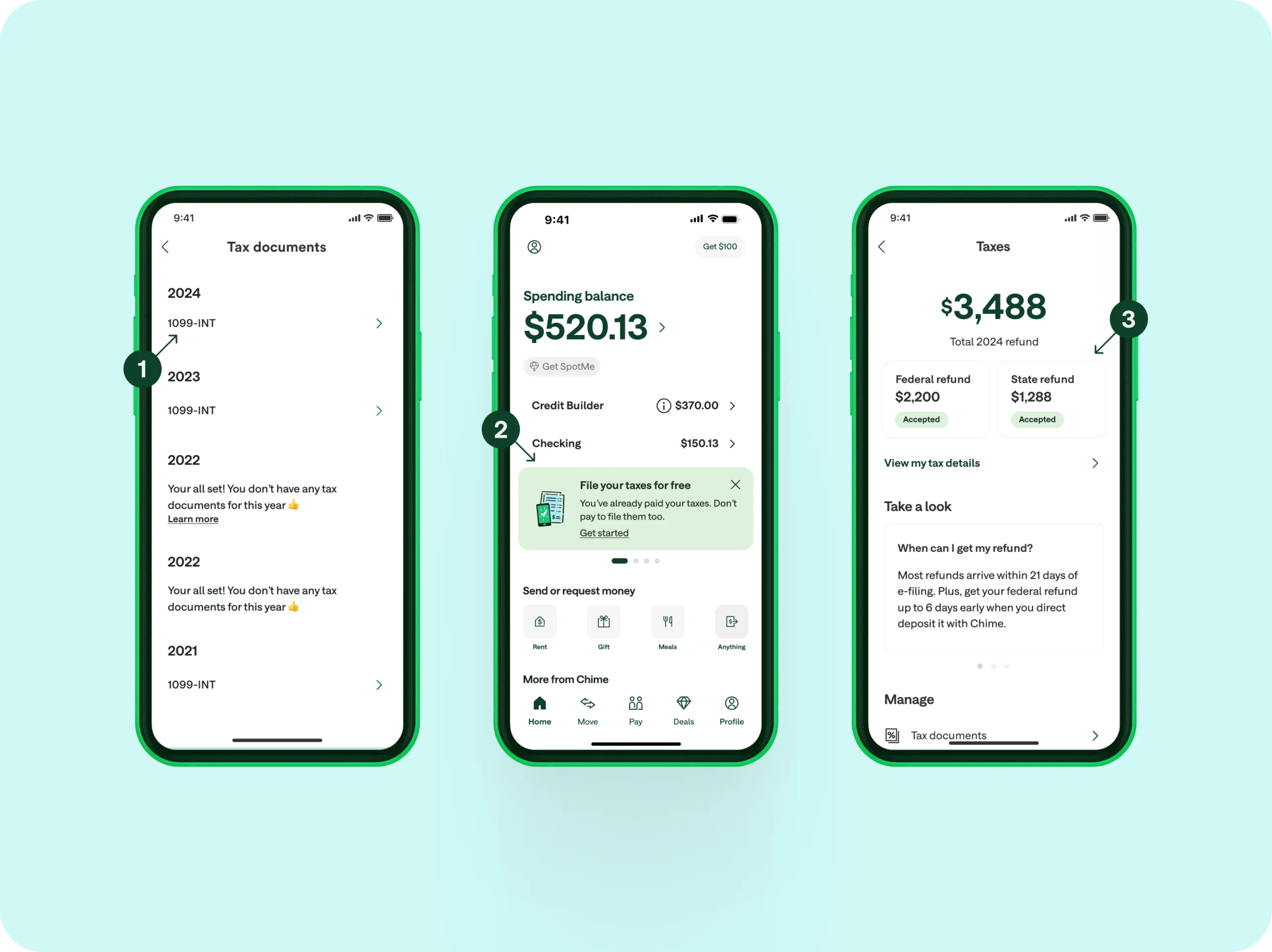
Here's what it looks like when you file taxes in the Chime app:
Find your tax form in "Tax documents" in Settings.
Easily find the Taxes section on the homepage to start filing your taxes.
Once you file, head back to the Taxes section to see your expected federal and state refunds.
When do I get my tax refund?
The timing of your tax refund depends on when and how you file. The IRS says it takes about 21 days to receive refunds for e-filed returns.9 That said, if you file early during tax season, there may be fewer returns to process and you might get your refund sooner.
If you mail a return or submit an amended return, expect refunds to take six weeks or longer.9
The good news? If you e-file and choose to receive your refund via direct deposit through Chime, you can receive your federal refund up to 5 days early!2
Don't pay to file taxes – file through Chime
Paying taxes should be easy – and it should be free, too. But because they can be complicated, Americans spend $290 on average to file their taxes.1
Chime members don't have to choose between saving money and getting help with taxes. When you file through Chime, get unlimited support when you need a little more help. File your taxes in the app – it's 100% free to file.
Don't miss out. Your max refund is waiting.
"Filing through Chime was a lot simpler and faster than I expected. I was concerned the process would be complicated because I had W2's from three different jobs and in two different states, and I had a legal name change last year. Fortunately the process was still simple and took me no time!"
— Simon | Real members. Paid testimonials.