
 Log in


Key takeaways
- Chime members can earn cash back on everyday spending (like gas, groceries, and dining) by activating Chime Deals in the Chime app.
- You can access Chime Deals from the Deals tab: open the app, choose a deal, activate it, pay with a Chime card, and earn cash back.
- Cash back from eligible purchases is automatically deposited into your Chime Checking Account within 10 business days.
Getting cash back on purchases you make every day is like finding a “golden ticket” every time you open the Chime® app and use Chime Deals® near you.
Chime Deals lets eligible members get cash back at retailers they already visit for gas, groceries, dining out, and more. When you qualify for Chime Plus status,# you can unlock even more exclusive and personalized deals at national and regional retailers.
Open the app to see your available deals, activate the one you want, swipe or tap a Chime card to pay, and get cash back straight to your account. Here’s how it works.
What is Chime Deals?
Chime Deals is a cash back program that helps Chime members get money back on eligible purchases at participating retailers. Once you activate a deal in the Chime app, you just tap or swipe any of your eligible Chime cards (credit or debit) to pay and earn cash back on that purchase.
Your deals travel with you, whether you’re close to home or on the road.
Available deals are shown in the app and are available at thousands of locations nationwide.
You’ll see nearby offers in the in‑app map, so you can quickly spot gas, grocery, or dining deals close to where you are.
For example, if you need to fuel up before work, you can:
- Open the Chime app and navigate to Deals.
- Check the map to see gas deals nearby.
- Activate a deal at a station you plan to visit.
- Tap or swipe your Chime card at the pump within the time window.
If the deal offers up to $0.22/gallon back on gas,¹ filling a 10‑gallon tank could put around $2 back in your pocket. Fill up once a week and that can add up over time.
All of this is designed to help your everyday spending go further, without adding extra steps or a separate rewards app to manage.
How Chime Plus makes Chime Deals even better
When you set up direct deposit with Chime for free and receive a qualifying direct deposit into your Chime Checking Account, you become a Chime Plus member.#
As a Chime Plus member, you can:
- Unlock exclusive cash back deals at top retailers nationwide
- See more personalized offers based on where you shop most often
- Enjoy additional banking benefits that work alongside Chime Deals, including:
- Higher‑yield savings with a boosted APY² so your balance can grow faster
- Access to MyPay, which can let you get up to $500 of your paycheck before payday when eligible³
- Fee-free overdraft coverage with SpotMe®, for up to your SpotMe limit, so you can cover unexpected expenses without overdraft fees⁴
- Priority support so you can get in touch with a live agent faster when you need help
Chime Plus is designed to wrap all of these benefits together so you can save more, smooth out your cash flow, and still get rewarded for everyday spending.
How to use Chime Deals in the app
Chime Deals is easy to find and use directly in the Chime app.
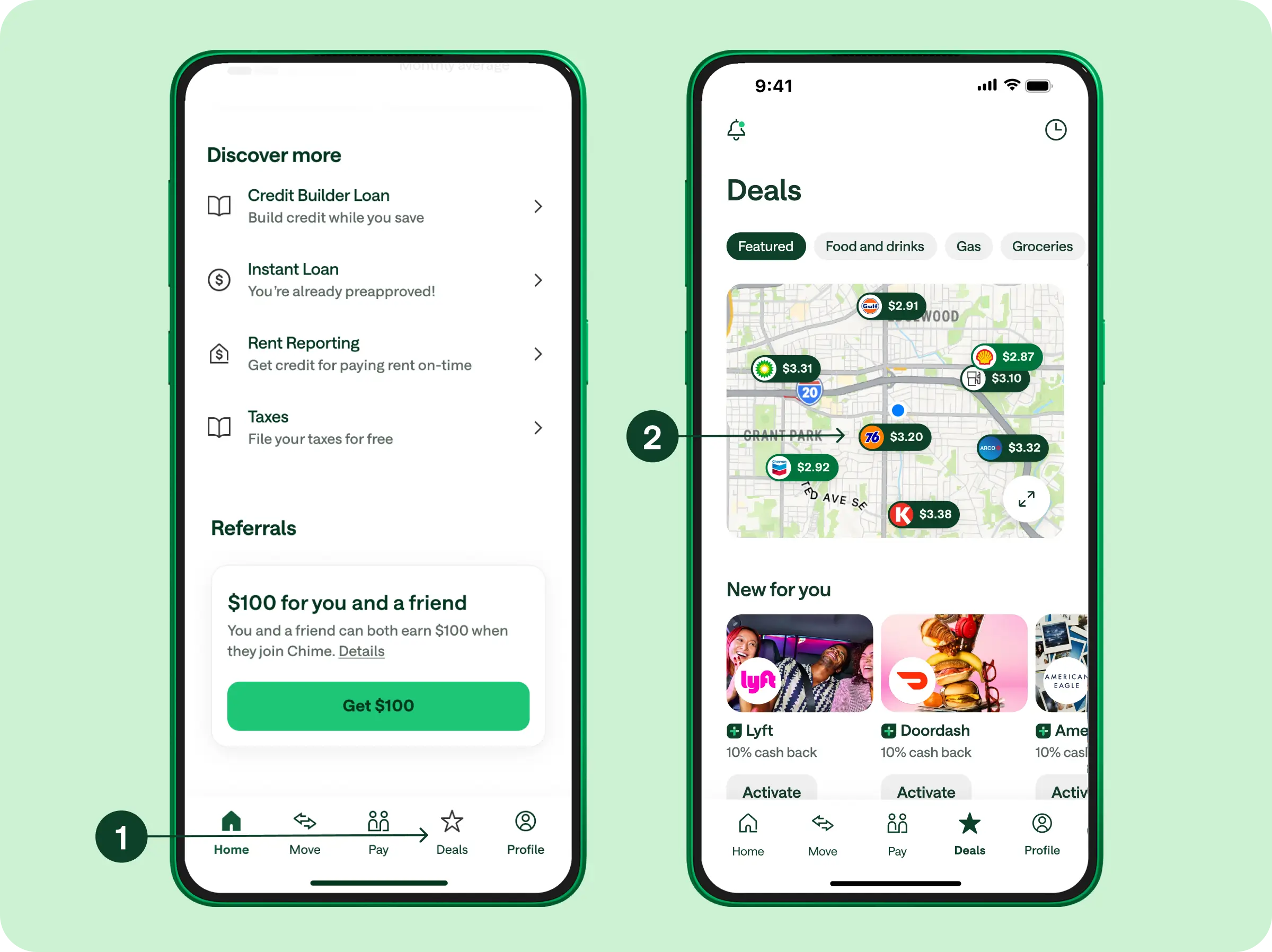
1. Open the Chime app and navigate to Deals
On the Home screen, tap Deals on the bottom navigation to see deals nearby via the in-app map.
If you’re a Chime Plus member, you’ll see even more exclusive, tailored offers based on where you’ve been shopping the most.
2. Choose and activate a deal
When you find a deal you want to use, tap it to see the details (location, type of purchase, and how long the offer lasts). Then tap Activate.
Pro tip: Activate your deal when you’re on your way or shortly before you plan to make your purchase. Each deal has a time‑limited window, so activating too early can cause it to expire before you use it.
3. Redeem the deal with a physical Chime card
After you activate the deal, redeem it within the specified time window by tapping or swiping your physical Chime® Visa® Debit Card or secured Chime® Credit Builder Visa® Credit Card at the participating retailer location before the deal ends.
- For most deals, you’ll need to use your physical card in person to redeem the offer.
- Chime Plus exclusive deals may also be redeemable when you use your eligible Chime card through Apple Pay®; always check the offer details in the app to confirm how you can redeem.
4. Get your cash back
Once you’ve made an eligible purchase with your Chime card, you’ll see cash back deposited directly into your Chime Checking Account, typically within 10 business days.
You don’t have to upload receipts, scan barcodes, or track separate balances – the cash back just lands in your account when it’s ready.
For full terms, visit to the Chime Deals terms and conditions.
Where can I use Chime Deals?
With thousands of locations and offers available nationwide, you can use Chime Deals at many of the retailers you already visit regularly.
Examples of the kinds of deals you might see in the app include:
- Cash back per gallon at major gas stations
- A percentage back on fast‑casual dining and quick‑service restaurants
- Cash back on groceries at regional and national chains
All available deals – and the exact cash back amounts – will be shown in the Chime app. Offers may vary by location, category, and time.
How does cash back work?
Cash back is money you earn back on eligible purchases. Instead of a discount at checkout, you pay the regular price and then receive a portion of that spending back after the fact.
Here’s how cash back typically works:
- You make a purchase with an eligible card or through a partner offer.
- The program tracks your spending and calculates your reward based on the offer terms (for example, 5% cash back on groceries).
- You receive your reward as a statement credit, direct deposit, or other type of payout.
For instance, if a deal offers 5% cash back on groceries and you spend $50, you’d get $2.50 back.
However, not all cash back programs work the same way. Many third‑party apps require:
- Uploading photos of receipts
- Linking email for eReceipts
- Scanning barcodes as you shop
- Waiting to hit a minimum balance before you can cash out
Some even limit how you receive your rewards, paying out via gift cards, checks, or peer‑to‑peer apps instead of simply depositing money in your bank account.
With Chime Deals, the goal is to keep it simple:
- Activate a deal in the app.
- Pay with your Chime card.
- Get cash back deposited directly into your Chime Checking Account – without uploading receipts, meeting a separate payout threshold, or managing multiple apps.
Chime Deals: Your one-stop-shop on everyday deals
Money back on groceries, gas, and dining out is just a few taps away.
While you’re taking care of your day‑to‑day errands, Chime Deals can help you get a little more from the purchases you’re already making. Activate deals (including Chime Plus exclusive offers) at thousands of locations nationwide, all from within the Chime app using any eligible Chime card.
And remember: If you set up a qualifying direct deposit and become a Chime Plus member,# you’ll unlock personalized deals that go beyond everyday spending, plus additional benefits designed to help you save, spend, and access your money on your terms.
FAQs on Chime Deals
Do I need to have an activated card to use Chime Deals?
Yes, to use Chime Deals, you need a Chime Checking Account and must have either an activated Chime Visa® Debit Card or Chime Credit Builder Visa® Credit Card.
If you’re new to Chime, be sure to activate your card so that you can start earning cash back through Chime Deals. And if you’re not yet a member, you’ll need to sign up for a Chime Checking Account, then activate your Chime card to start earning cash back rewards.
Can I make purchases with Apple Pay® to redeem deals on Chime Deals?
Some Chime Plus exclusive deals can be redeemed when you use an eligible Chime card through Apple Pay. For other deals, you’ll need to tap or swipe your physical Chime card at the retailer to earn cash back.
Always check the offer details in the app to see which payment methods are eligible for a specific deal.
Once I activate a deal, how long do I have to redeem it?
After activating a cash back deal, you have a set amount of time to redeem it. This time window varies from offer to offer, so be sure to check the offer details in your Chime app to confirm. We generally recommend waiting until you’re ready to use a deal before activating to avoid the offer expiring prior to using.
What is Chime+?
Chime+ unlocks exclusive benefits for any member that receives a qualifying direct deposit. You just need to set up a direct deposit of $200 or more into your Chime Checking Account, and we’ll automatically upgrade you to Chime+ status.# Chime+ members unlock access MyPay®, higher savings rates, priority support, and personalized cashback deals based on where they spend the most.¹
Can you get cash back with Chime?
Yes! With Chime Deals, you can earn cash back at thousands of retailers, restaurants, and gas stations just by activating deals in the app and paying with your Chime card. Chime+ members get even more personalized and exclusive offers, making everyday spending even more rewarding.