
 Log in


Key takeaways
- Chime Card™ is a secured Chime Visa® Credit Card that helps you build credit with your own money, with no interest charges or annual fees.
- When you qualify for Chime Plus or Chime Prime through qualifying direct deposits‡, you can earn 2% or 5% cash back on a category of your choice1 when you pay with Chime Card, on up to $1,500 in eligible purchases each month.
- Chime Card works with your Chime Checking Account and Secured Deposit Account to give you one Available balance you can use anywhere Visa credit cards are accepted.2
Build credit safely with 0% interest,3 earn cash back,1 and unlock the best of banking – all in one card.
Chime Card has safe credit-building features you love, access to over 47,000 fee-free ATMs,4 and cash back on a selected category.1
But how does it work, and how can you get one?
What is Chime Card?
Chime Card™ is a secured credit card that helps you build credit5 with the ability to earn cash back on your spending.1 Chime Card combines the best features of banking and credit into a single card that you can use anywhere Visa credit cards are accepted.
When you open a Chime Checking Account and add Chime Card, you also get a Secured Deposit Account (SDA). 5 These three accounts work together to give you one Available balance you can see in the app and spend anywhere Visa credit cards are accepted.
Here’s what you get with Chime Card:
- Cash back. With qualifying direct deposits‡:
- Chime Plus members can earn 2% cash back on eligible Chime Card purchases in a category of their choice, on up to $1,500 in qualifying spend each month. 1
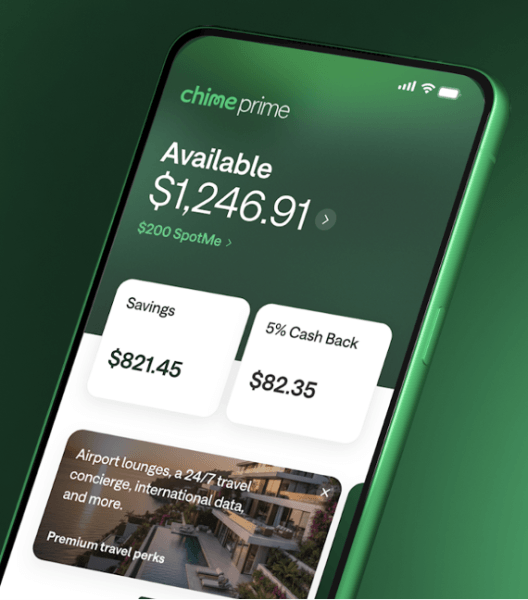
- Chime Prime members can earn 5% cash back on eligible Chime Card purchases in a category of their choice, on up to $1,500 in qualifying spend each month1 plus exclusive travel perks, like Priority Pass membership. +
- Build credit safely. Chime Card helps you to build credit history using your own money. There are no interest charges3 or annual fees, no minimum security deposit requirements,2 and no credit check needed to apply.
- Access to cash. If you need cash, Chime Card allows withdrawals at more than 47,000 fee-free ATMs nationwide.4
- One balance. Chime simplifies money management, with a single view of your Available balance in the mobile app. You can choose to spend that Available balance with credit or debit.
How to get Chime Card
It‘s easy to get the cash back card you can bank on. Here’s how to get Chime Card.
- Sign up for Chime. You’ll need to open a Chime Checking account when you get a Chime Card.15 To open a Chime account, you need to share your personal details and verify your identity, and download the Chime app. Chime accounts are available to people 18 years and older who have a valid U.S. address.
- Add Chime Card. After you open your Chime Checking Account, you can add Chime Card from within the Chime app. There’s no credit check required.
- Wait for your Chime Card to arrive. It usually takes 7 to 10 business days for your physical Chime Card to arrive. In the meantime, you’ll have access to a virtual Chime Card and a virtual debit card that you can use to shop online.
- Fund your account. When you get Chime Card, you get a checking account and a Secured Deposit Account. The money you deposit acts as your card’s credit limit.7
- Enroll in direct deposit (Optional). Direct deposit helps you unlock the full benefits of Chime Card, including up to 5% cash back1 on rotating purchase categories. You can choose to enroll in direct deposit through the Automatic Setup feature in the Chime app, but it is not required to get the card.
How direct deposits can boost your Chime Card rewards:
- Chime Plus unlocks:
- 2% cash back on your chosen spending category like gas, groceries, or restaurants with Chime Card, on up to $1,500 in qualifying spend each month.1
- Chime Prime unlocks:
- 5% cash back on your chosen spending category, like gas, groceries, or restaurants with Chime Card, on up to $1,500 in qualifying spend each month.1
- Two metal premium Chime Card designs. You can choose the onyx metal Chime Card for free, or upgrade to a titanium colored Chime Card for $35 + tax.
- Members may be eligible for larger MyPay limits, higher SpotMe limits, and Instant Loans up to a maximum amount displayed in the app*
- Additional Prime‑exclusive perks and experiences over time, such as Priority Pass membership.
These membership tiers don’t change how Chime Card works — they simply increase your cash‑back potential, enhance your card design options, and unlock additional Chime Card travel perks when you qualify through direct deposit.
How does cash back work with Chime Card?
Once you’ve received Chime Plus or Chime Prime status with qualifying direct deposits‡, you can start earning cash back on eligible purchases when you pay with Chime Card.
Here’s how it works:
- Choose a category of your choice. Instead of rotating categories on a fixed schedule, you’ll select a monthly spend category in the Chime app’s rewards hub. Categories may include everyday expenses like gas, groceries, restaurants, utilities, and more (categories are subject to change — check the app for the latest options).
- Earn cash back on up to $1,500 in eligible purchases each month.
With qualifying direct deposits:- Chime Plus members can earn 2% cash back on eligible Chime Card purchases in their selected category, on up to $1,500 in qualifying spend each month.1
- Chime Prime members can earn 5% cash back on eligible Chime Card purchases in their selected category, on up to $1,500 in qualifying spend each month.1
- Track rewards in the app.
You can see how much cash back you’ve earned for the month and which purchases qualified directly in the Chime app’s rewards hub. Rewards are issued on a recurring basis (for example, weekly), and you’ll receive a statement summary that shows your total earned cash back.
Cash back earned with Chime Card is separate from Chime Deals, which means you can stack rewards and earn even more when offers line up.8
How to view your rewards
You can view your cash back and your current category of choice in the Chime mobile app:
- Log in to the Chime app and navigate to the rewards section.
- Under your account balance, you’ll see how much cash back you’ve earned for the current period.
- Tap your cash back total to:
- See your current category of choice.
- Review your eligible transactions in that category.
- Preview upcoming categories and offers so you can plan your spending.
The rewards hub is the best place to stay on top of your category, see how close you are to the $1,500 monthly cap on qualifying spend, and find new ways to earn.
The rewards hub lets you stay connected to your cash back earnings and view current offers. You can also get a preview of what’s coming soon, which can help you plan future purchases for maximum cash back.
How to use Chime Card
You can use your Chime Card to make purchases anywhere Visa credit cards are accepted, including in-person or online. To get started, you’ll first need to fund the card.
H3: Fund your card
You can add funds to your account in a few ways:
- Set up direct deposit.
- Move money with Apple Pay®.
- Transfer money from a debit card (with no fees!)
- Send money using a payment app like PayPal® or Venmo®.
- Deposit cash7 at over 100,000 locations – just look in the Chime app.
When you log in to the Chime app, you’ll see your single account balance view. This balance reflects the total money you have in your Chime account, which is the amount that’s available to spend with your Chime Card. For example, if your “Available” balance is $1,000, your available credit limit for Chime Card is also $1,000.
Your Available balance includes funds in your Secured Deposit Account that you can spend using your debit card or Chime Card9. It does not include balances in Savings accounts. Whenever you spend using your debit card or Chime Card, the transaction amount is deducted from the Available balance.
Chime Card only allows you to spend the money you have available, so staying within your “credit limit” is easy.
Spend to build credit
When you spend with Chime Card and make on-time payments, you can build credit over time.5 Chime reports your Chime Card payment activity to all three credit bureaus: TransUnion®, Experian®, and Equifax®.
On-time payments are the most important factor for credit score calculations.
You can build credit with Chime Card when you:
- Use your card to make purchases.
- Pay your balance on time each month
Turn on the Safer Credit Building feature in your app for automatic on-time payments.5 Safer Credit Building is an autopay feature. It uses the money you have in your Secured Account to pay off your Chime Card monthly balance in full. This way, your balance is paid on time each month without you needing to do anything.
Still confused about how Chime Card can help you get better credit scores? Check out our guides on how to build credit with Chime and how credit reporting works with Chime Card.
While your Chime Card works at any retailer that accepts Visa credit cards, you have options if you need to use a debit card. You can use your virtual debit card, for example, by adding it to Apple Wallet® or Google Wallet® or using it for online transactions. While your Chime Card can help you build credit when you use it and pay on time, debit card purchases don’t build credit. They’re another way to spend your Available balance for everyday transactions.
More ways to help improve your credit with Chime
There’s a lot you can do with your Chime Card to help improve your credit, aside from using it to develop a positive payment history. Here are some other ways to take control of your credit with Chime.
- Check your credit scores for free. Log in to the mobile app to view your FICO® score10 and track your progress.
- Improve your credit scores with Experian Boost®.11 We’ve partnered with Experian® to help you improve your scores using bills you already pay through Chime.
- Build credit monthly with rent reporting12. If you rent, you will soon be able to use your on-time rent payments in the app to help raise your credit score.
Get credit tips tailored to your journey. The Chime app delivers personalized tips and advice to help you navigate your finances as you work to build higher credit scores.
Get your Chime Card today
Chime Card is a rewarding way to build credit5 and unlock financial progress™. Chime Card provides the tools you need to stay on top of your spending, savings, and budget.
It’s fast and easy to get started and unlock the full benefits of Chime.
Frequently asked questions
How do I add money to my Chime Card?
When you set up your Chime Card, you’ll also get a Chime checking account and a Chime Secured Deposit Account. As you add money to your checking account, it’s automatically transferred to your Secured Deposit Account.7 Chime lets you add to your balance by moving money with Apple Pay, transferring funds from a debit card fee-free, sending money using a payment app like PayPal or Venmo, and cash deposits9 at over 100,000 locations.
Does Chime Card have a spending limit?
Your Chime Card spending limit is determined by your Available balance. You can log in to the Chime mobile app to view your available balance and add funds.
What ATMs are free to use with Chime Card?
You can use your Chime Card to withdraw cash at more than 47,000 fee-free ATMs4 nationwide. Chime’s ATM network includes Allpoint, Visa Plus Alliance, and MoneyPass ATMs. You can log in to the Chime mobile app to find a fee-free ATM near you. A $2.50 fee applies to make withdrawals at out-of-network ATMs.
Is Chime Card a credit card?
Yes! Chime Card is a secured credit card that doesn’t require a credit check. The money in your Chime secured deposit account determines how much you can spend with your card.2 Payment activity is reported to the credit bureaus to help you build or rebuild your credit.5
Can I use my Chime Card as a debit card?
The physical Chime Card cannot be used as a debit card for POS transactions. If you choose Chime Card when opening a Chime account, you get a physical card that functions like a credit card. However, you also get a virtual debit card that you can use online. You can add your virtual debit card to Apple Wallet or Google Wallet to pay with debit in stores, or request a physical debit card via the Chime mobile app.
How is Chime Card different than other credit cards?
Chime Card is a secured credit card that doesn’t require a credit check or minimum security deposit to open. You can only spend the funds available in your secured deposit account.7 When you pay your balance, your payment history is reported to the credit bureaus. Chime Card helps you avoid overspending. There’s no interest3 on balances and no annual fees.
Chime Card is unique because it works alongside your Chime Checking Account, so you can use traditional checking features like accessing cash fee-free at in-network ATMs² and optional fee-free overdraft with SpotMe® if you qualify and enroll.¹³ To open Chime Card, we create three accounts for you: a Chime checking account, a secured deposit account, and a credit line account, which is your Chime Card.
Does SpotMe work on Chime Card?
SpotMe® can work with both your Chime Card and your debit card once you qualify and enroll in SpotMe and have the feature enabled in your app.¹³ For eligible members with SpotMe turned on, SpotMe may cover qualifying purchases and cash withdrawals made with your cards up to your SpotMe limit, which is shared between your Chime Card and your virtual or physical debit card.¹³
When should I use my Chime Card and when should I use my virtual debit card?
You’ll get the most benefit from using your Chime Card for purchases that earn cash back in your selected category, on up to $1,500 of eligible purchases each month.¹ Chime Card is also useful any time you want to build credit on everyday spending.
Your virtual debit card is another way to use your Available balance for everyday transactions. Some online merchants or money transfer apps may only accept debit, so you can use your virtual debit card in those cases — keeping in mind that debit purchases don’t build credit.
How long does it take for my Chime Card to arrive?
After you enroll, your Chime Card will be on its way. Typically, it takes 7-10 business days on average for your card to arrive.
How and when do I pay off the card?
You can pay off your Chime Card in three ways:
- When you turn on Safer Credit Building,5 we will automatically pay your Chime Card balance with funds set aside in your Secured Deposit Account.7 This will help you avoid late payments and outstanding balances.
- If Safer Credit Building is not turned on, manual payments can still be made at any time by going to Settings → Safer Credit Building → Make a Payment. Payments can be made from your Secured Deposit Account or from another bank account.
- ACH Payments can be made from any bank by using Chime Card’s account and routing numbers. To find them, go to Settings → Safer Credit Building → Make a Payment → Paying with another bank.
What happens if I miss a payment on my Chime Card?
There are no late fees or interest3 for missing Chime Card payments. But if you don’t pay your Chime Card statement balance within 24 days of the due date, you won’t be able to use your card again until the balance is paid in full. Late or missed payments, or defaulted accounts, could also be reported to the credit bureaus, which could hurt your credit scores.
How is Chime Card different from Credit Builder?
Chime Card is the next generation of the secured Chime Credit Builder Visa® Credit Card. You get the same outstanding credit-building5 capability, with built-in banking access and a chance to earn cash back. You still use your own money to build credit safely, with added features that make the card even better.
Can I add Chime Card to Apple Wallet or Google Wallet?
Yes, you can add Chime Card to Apple Wallet or Google Wallet. You can also add your virtual debit card for even more convenient spending.
Can I get both cash back rewards and Chime Deals cash back?
Yes, you can get cash back with Chime Card and earn cash back with Chime Deals8. You can use both types of cash back– they don’t limit one another.
How many accounts do you get when you sign up for Chime Card?
Three: a Chime Card credit account, A checking account, and a secured deposit account (SDA). These three accounts work seamlessly together to help you build credit safely5 with your own money. As you add money to your CHECKING account, it’s automatically transferred to your secured deposit account. What you’ll see in the app is a single account view of your “Available” balance in the SDA.2 The amount of money in your SDA acts as your spending limit on your Chime Card.7